Google Ads Not Converting? 10 Mistakes That Waste Your Budget (and How to Fix Them)
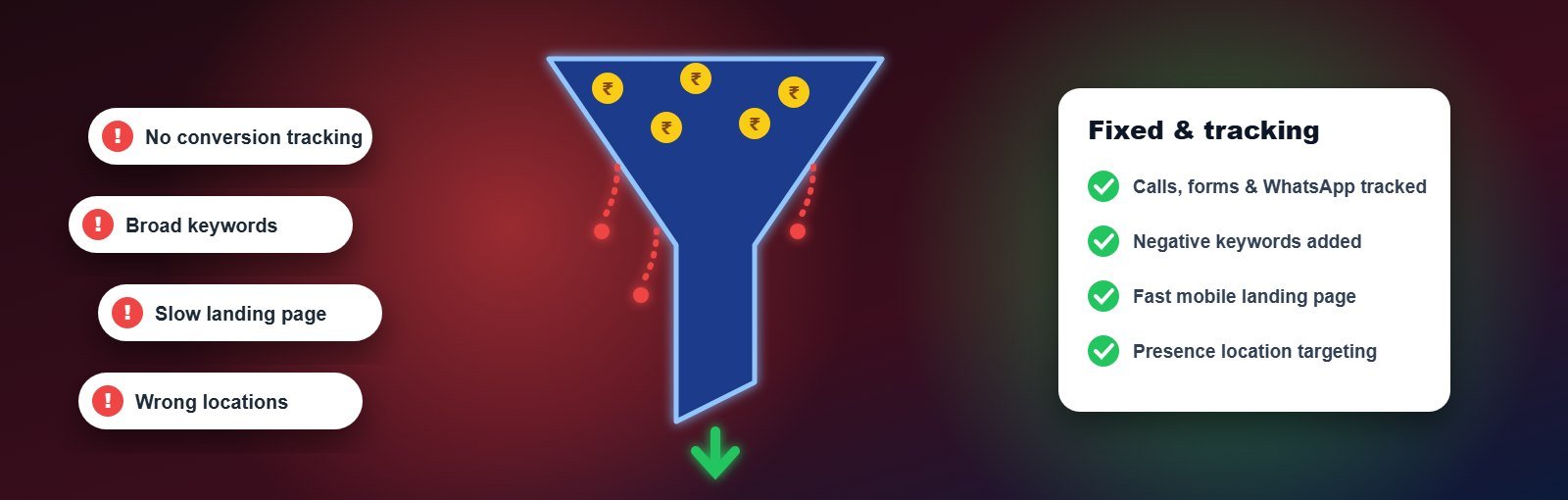
Your ads are getting impressions. People are clicking. The budget is being spent every day. But the phone is quiet and the enquiry form is empty. If that sounds familiar, the problem is almost never “Google Ads does not work for my business”. It is usually one or more of the mistakes below — and most of them can be fixed in a week.
Work through this list in order. The first three are the most common causes of wasted spend in small-business accounts.
Key takeaways
- Check conversion tracking first — you may be getting leads you cannot see, or optimising for the wrong action.
- Your search terms report shows what people actually typed. It is the fastest way to find wasted money.
- A weak landing page can make good ads look like failures.
Mistake 1: Conversion tracking is missing or wrong
Symptom: Google Ads shows zero or very few conversions, or shows conversions that do not match real enquiries.
Without accurate tracking you cannot tell which keywords bring business, and automated bidding has nothing to learn from. Common problems: tracking only page views instead of form submissions, counting the “thank you” page twice, not tracking phone calls or WhatsApp clicks at all.
Fix: Track every real lead action — form submissions, calls from ads, clicks on your phone number and WhatsApp button — using Google Tag Manager and GA4 or Google Ads tags. Then test each one yourself and confirm it appears in your account.
Mistake 2: Broad keywords with no negative keywords
Symptom: High clicks, low leads, and search terms that have nothing to do with buying.
A coaching institute bidding on “digital marketing” may pay for “digital marketing jobs”, “digital marketing salary” and “what is digital marketing pdf”.
Fix: Open the search terms report every week, add irrelevant words as negative keywords (“jobs”, “free”, “salary”, “pdf”, “meaning”) and use phrase or exact match for your most important keywords while you learn what converts.
Mistake 3: Sending traffic to the home page
Symptom: Good click-through rate, high bounce rate, few enquiries.
Someone who searched “kitchen interior designer Ahmedabad” and lands on a home page full of carousels has to work to find what they wanted. Most will not.
Fix: Use a focused landing page for each main service with the same words as the ad, a clear offer, proof (reviews, project photos), a short form and a visible call and WhatsApp button. It must load quickly on mobile.
Mistake 4: Targeting the wrong locations
Symptom: Clicks from cities or states you do not serve.
The default location option can show ads to people who are only “interested in” your location, not physically there.
Fix: In campaign settings choose “Presence: people in or regularly in your targeted locations”, and narrow the radius to areas you actually serve.
Mistake 5: Running ads when nobody can answer
Symptom: Calls go unanswered, leads come in at midnight and go cold by morning.
Fix: Use an ad schedule that matches your business hours for call-focused campaigns, and set up instant WhatsApp or SMS replies for form leads that arrive after hours.
Mistake 6: One ad group for everything
Symptom: Low Quality Scores and high cost per click.
When “wedding photography”, “product photography” and “baby photoshoot” share one ad, none of the searches gets a relevant message.
Fix: Create tightly themed ad groups with their own ads and landing pages. Relevance raises Quality Score, which lowers what you pay for the same position.
Mistake 7: Switching on automated bidding too early
Symptom: Costs jump and lead volume drops after switching to Maximise Conversions or Target CPA.
Smart bidding needs reliable conversion data. With only a handful of conversions a month, it has too little to learn from.
Fix: Start with Maximise Clicks (with a bid limit) or manual CPC, collect conversions with correct tracking, then move to conversion-based bidding once you have a steady flow — and give it two to three weeks to settle.
Mistake 8: Ignoring ad assets
Symptom: Small ads that take up little space and get fewer clicks than competitors.
Fix: Add sitelinks, callouts, structured snippets, call assets, location assets and images. They make your ad bigger and more useful at no extra cost per click.
Mistake 9: Judging results too quickly
Symptom: Campaigns paused after three days “because they did not work”.
Fix: Set a test budget that buys enough clicks to learn from (often 300–500 clicks), and judge on cost per lead after 4–8 weeks of optimisation, not on the first few days. Our Google Ads cost in India guide shows how to calculate a realistic test budget.
Mistake 10: No follow-up process for leads
Symptom: The ads report plenty of leads, but sales says “the leads are bad”.
Very often the leads are fine — they were called two days later, or never. Speed and consistency of follow-up decide how many leads become customers.
Fix: Route every lead to one place (a CRM, sheet or WhatsApp group), call within minutes during business hours, and record the outcome so you can feed real “qualified lead” data back into your campaigns.
A 15-minute Google Ads health check
| Check | Where to look | Healthy sign |
|---|---|---|
| Conversions recorded | Goals → Conversions summary | Matches real enquiries this week |
| Wasted search terms | Insights & reports → Search terms | Most terms show buying intent |
| Locations | Campaign settings → Locations | “Presence” option selected |
| Quality Score | Keywords (add the Quality Score column) | Main keywords at 6 or above |
| Landing page | Open it on your phone | Loads fast, offer and call button visible immediately |
If you are still not getting results after these fixes, it may be time for a professional audit. Our Google Ads agency in Ahmedabad reviews tracking, keywords, ads and landing pages and gives you a clear plan — and our website designing team can build landing pages made for conversions. For more ways to turn clicks into calls, read how to get more phone calls through Google Ads.
FAQs
Why am I getting clicks but no leads from Google Ads?
The most common reasons are irrelevant search terms, a landing page that does not match the ad, or conversion tracking that is not recording leads. Check the search terms report and your landing page on mobile first.
How many clicks does it take to get a lead?
For a focused landing page, 3–8 leads per 100 clicks is a realistic range for many service businesses. Far fewer usually points to a landing page or targeting problem.
Should I pause Google Ads if it is not working?
Pausing stops the waste but also stops learning. It is usually better to cut the budget, fix tracking and targeting, and restart with a focused campaign.
About the author: Written by the paid media team at Expert Web Designing, Ahmedabad, helping businesses get measurable results from digital marketing since 2010. Request a free Google Ads account review.