Click-to-WhatsApp Ads: A Practical Guide for Indian Businesses
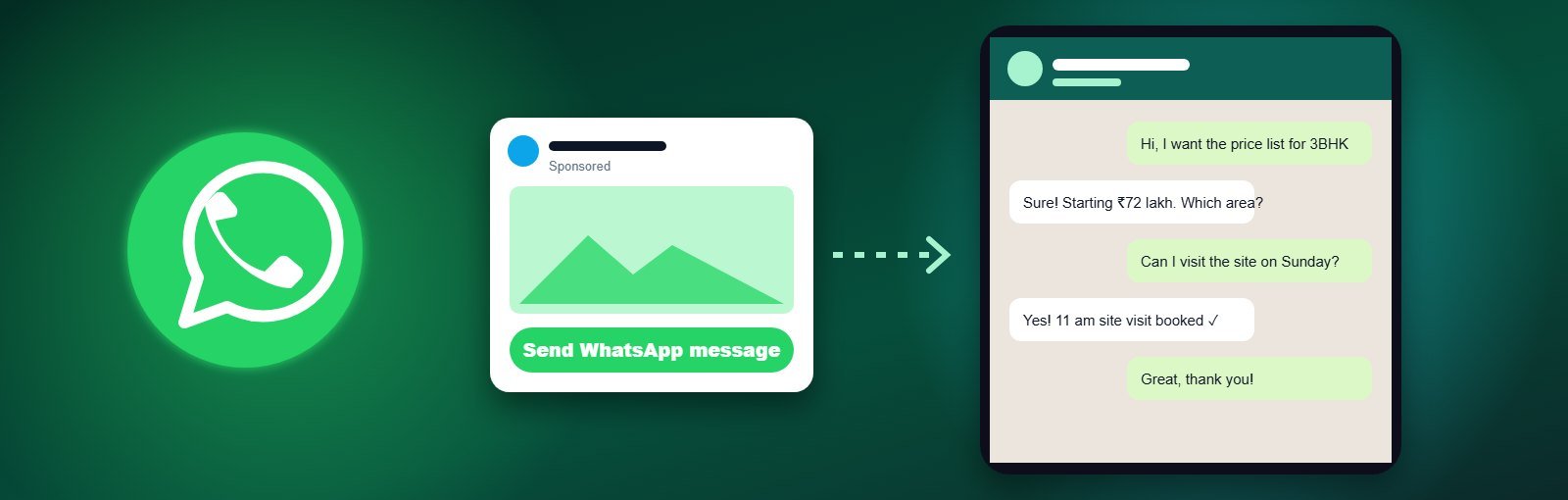
In India, customers would often rather send a WhatsApp message than fill a form or make a call. They want to ask the price, see a few photos, check availability — and decide on their own time. Click-to-WhatsApp ads are built for exactly that behaviour: someone taps your Facebook or Instagram ad and a WhatsApp chat with your business opens instantly, often with a pre-filled message.
Done well, they bring warm conversations at a lower cost than many lead forms. Done badly, they flood your phone with “Hi” and “Price?” messages that never convert. This guide shows how to get the first result and avoid the second.
Key takeaways
- Click-to-WhatsApp ads run in Meta Ads Manager and appear on Facebook and Instagram.
- They work best for businesses that sell through conversation: local services, clinics, real estate, education, retail and D2C brands.
- A pre-filled message, quick greeting and fast reply decide whether chats become customers.
- Label every chat so you can measure cost per qualified conversation, not just cost per message.
What are click-to-WhatsApp ads?
They are Meta ads with WhatsApp as the destination. Instead of sending people to a website or a form, the button (“Send WhatsApp message”) opens a chat with your business number. You can run them with the WhatsApp Business app on your phone or with the WhatsApp Business Platform (API) for larger teams.
If you are new to Meta advertising, read What Are Meta Ads? first.
Which businesses get the best results?
| Business type | Why WhatsApp works | Example ad hook |
|---|---|---|
| Clinics & salons | Quick booking questions | “Book your skin consultation on WhatsApp” |
| Real estate | Buyers want brochures, prices and site visit slots | “Get the floor plan and price list on WhatsApp” |
| Coaching & courses | Parents and students ask about batches and fees | “Check next batch dates on WhatsApp” |
| Retail & D2C brands | Customers want photos, sizes and availability | “See today’s new arrivals on WhatsApp” |
| B2B & manufacturers | Dealers ask for catalogues and bulk pricing | “Get our dealer catalogue on WhatsApp” |
What you need before you start
- A Facebook Page (and Instagram account, if you want Instagram placements) connected in Meta Business Manager.
- A WhatsApp Business number linked to the Page — either the WhatsApp Business app or the WhatsApp Business Platform.
- A greeting message and quick replies for common questions (price, location, timings).
- Someone who can reply within minutes during your ad hours.
How to set up a click-to-WhatsApp campaign
- In Ads Manager, create a campaign with the Engagement, Leads or Sales objective (depending on your goal).
- At ad set level, choose Messaging apps as the conversion location and select WhatsApp.
- Set your location, age and budget. Start broad within your service area and let Meta find responsive people.
- Create the ad: one clear benefit, real photos or a short Reel, and the “Send WhatsApp message” button.
- Set a pre-filled message that tells you what the person wants — for example, “Hi, I would like the price list for 3BHK flats”.
- Publish, then send yourself a test message from the ad preview to check the flow.
The conversation is the landing page
With click-to-WhatsApp ads, your chat replaces the landing page. That is where most campaigns win or lose.
Reply in minutes, not hours
Interest drops quickly. A reply within five minutes feels like good service; a reply the next morning often goes unread.
Use a greeting that moves the chat forward
Instead of “Thanks for contacting us”, ask one useful question: “Thanks! Is this for a 2BHK or 3BHK, and which area do you prefer?”
Answer the price question honestly
People ask about price because they are comparing. Share a starting price or range, then explain what affects it. Avoiding the question loses trust.
Use labels to track quality
In WhatsApp Business, label chats as “New lead”, “Qualified”, “Site visit booked” or “Converted”. After two weeks, you will know your real cost per qualified lead.
What do click-to-WhatsApp ads cost?
You pay Meta for the ad, usually measured as cost per messaging conversation started. For many local businesses in India this is comparable to or lower than the cost of an instant-form lead, but the real comparison is cost per qualified conversation. If you use the WhatsApp Business Platform, conversations that start from a click-to-WhatsApp ad come with a free messaging window (currently 72 hours) for follow-up messages.
For realistic budgets and cost ranges, see our Meta Ads cost in India guide.
Six common mistakes
- No pre-filled message — you get “Hi” and have to guess what they want.
- Running ads when no one is available — schedule ads for hours when your team can reply.
- Too many people sharing one phone — use the WhatsApp Business Platform or a shared inbox once volume grows.
- Judging by cost per message — a cheap message from the wrong audience is still waste.
- Sending long brochures first — answer the question, then share the brochure.
- Never following up — a polite follow-up the next day often converts people who were busy.
Click-to-WhatsApp vs lead form ads
| Click-to-WhatsApp | Instant lead form | |
|---|---|---|
| Customer effort | One tap to start chatting | Fill or confirm a short form |
| Lead quality | Often warmer — they started a conversation | Varies; improves with qualifying questions |
| Team effort | Needs fast, live replies | Can be called back later |
| Best for | Questions before buying, local and visual businesses | Call-back sales teams, high volume |
Many businesses run both and compare cost per qualified lead after a few weeks.
Want help setting it up?
Our Meta Ads agency in Ahmedabad plans click-to-WhatsApp campaigns, creates the ads, sets up greetings and tracking, and reports cost per qualified conversation every month. Strong organic content makes these ads work even better — see our social media marketing services.
FAQs
Can I run click-to-WhatsApp ads with the normal WhatsApp Business app?
Yes. You can link a WhatsApp Business app number to your Facebook Page and run these ads. Larger teams often move to the WhatsApp Business Platform for shared inboxes and automation.
Do click-to-WhatsApp ads work on Instagram?
Yes. The same campaign can run on Facebook and Instagram placements.
How do I know which chats came from ads?
Use a specific pre-filled message for each campaign, and label chats in WhatsApp Business. Ads Manager also reports the number of messaging conversations started.
About the author: Written by the paid social team at Expert Web Designing, a digital marketing agency in Ahmedabad since 2010. Ask us about WhatsApp lead campaigns for your business.